
We have completed the upgrade of our Online Cash Management for Business.
| For your convenience, the information below includes important checklists, quick references, video tutorials, and other resources for use after the completion of our conversion on Monday, February 9, 2026, to ensure the best possible transition experience. (This information was also provided via email.) |
{beginAccordion}
"Day One" Checklists
Below are "Day One" Checklists for use with our new Cash Management system the first time you log in on or after February 9, 2026. Please refer to the document that best fits the list of features that your company uses.
|
|
{endAccordion}
{beginAccordion}
Quick References
|
|
{endAccordion}
{beginAccordion}
Video Tutorials (High Level) - Desktop (Thumbnails)
|
|
|
|
Scroll down to "Video Tutorials (Detailed)" for additional videos. |
|














{endAccordion}
{beginAccordion}
Video Tutorials (High Level) - Mobile (Thumbnails)
|
|
|
|
Scroll down to "Video Tutorials (Detailed)" for additional videos. |
|








{endAccordion}
{beginAccordion}
Video Tutorials (Detailed) - Desktop & Mobile (Text Links)
|
DESKTOP |
DESKTOP (cont.) |
DESKTOP (cont.) - Alerts |
MOBILE |
|
{endAccordion}
Below is the pre-conversion information we sent by email and that appeared at the top of this page prior to conversion completion.
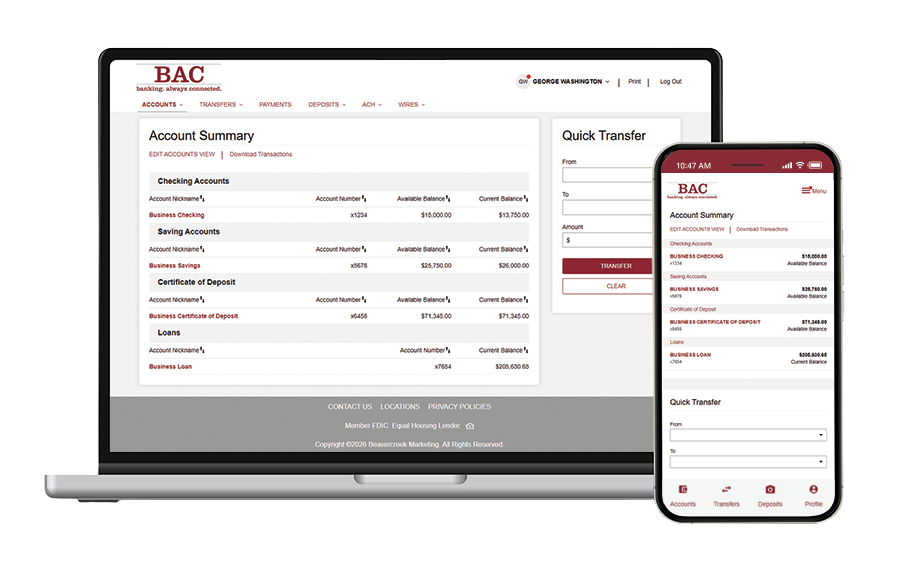
We are excited to let you know that we’ll be introducing several digital upgrades throughout 2026 and beyond. These enhancements are designed to make it easier for you to manage your banking with cutting-edge tools and improve the way you interact with us.
For starters, we are upgrading our Online Cash Management for Business in February.
|
This Upgrade Simplifies Digital Banking
|
Want a sneak peek?
Visit our desktop and mobile click thru demos.
Important to Know:
- Friday, February 6, 2026 – Online Cash Management will be taken offline at 4:00 p.m. and will be unavailable until the upgrade is complete on Monday morning.
Please review how this will impact Bill Pay, Internal Transfers, ACH, Wires, In-Office Deposit, and Positive Pay in the details below.
- Monday, February 9, 2026 – Our new and improved Online Cash Management system is expected to be available for use by 10:00 a.m.
Please review the details below to see how features like website log-in, mobile banking, and Digipass will change with this update.
| The information below includes important “next steps” and best practices for you to complete before Friday, February 6, 2026, to ensure the best possible transition experience. |
Helpful References
How To Save ACH Templates & History [PDF]
How To Save WIRE Templates & History [PDF]
Frequently Asked Questions [PDF]
{beginAccordion}
Website Log-In
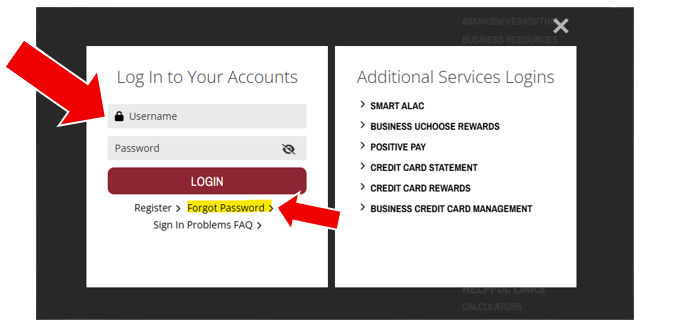
There will be a new process for accessing Cash Management from our website. You will be able to enter your business username and password from the single log-in panel when clicking the LOG IN button on our website.
NOTE: You will no longer need to click a button to select the Cash Management log in.
All users will be prompted to enter their mobile telephone number at the initial log in. Going forward a one-time passcode (OTP) will be sent to this device to confirm your identity.
NOTE:
- Username. Most usernames will convert with no change needed. You will be contacted directly if there is a need to update your business username before the upgrade. (Any new username will need to contain at least 10 characters.)
- Password. If you know your username but forgot your password, the Forgot Password link will be available.
{endAccordion}
{beginAccordion}
Mobile Banking App
Accessing any of your accounts will now be done through the single BAC Digital Banking app. If you are already using this app for your Personal accounts, simply enter your business username and password to access your Business account and Cash Management features.
- If you do not already have the BAC Digital Banking app, it can be downloaded and installed at any time using the QR code or link below from your smart phone.
NOTE: Business accounts will be accessible starting February 9, 2026. Your password will be needed when logging in for the first time. Upon successful login, Biometric Sign In can be enabled.

www.bankbac.com/BACDigitalBankingApp
- If you have signed up for Mobile Deposit, it will be accessible through the BAC Digital Banking app. Contact us if you would like to add Mobile Deposit to your access.
NOTE: The former BAC Business Banking app will sunset at 4:00 p.m. on February 6, 2026, and should be removed from your device.
{endAccordion}
{beginAccordion}
Digipass
This upgrade utilizes a new version of Digipass. When logging in for the first time you will be prompted to download and install the new version of Digipass.
Quick Reference: Digipass - Download & Activation

NOTE:
- Users will need their username, password, one-time passcode and Digipass token.
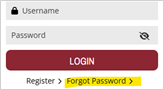
- If you don't remember your password, simply click Forgot Password from the Log In panel to reset your password to begin the activation process for your new Digipass.
- The PIN number previously entered with the token will no longer be needed.
{endAccordion}
{beginAccordion}
Bill Pay
If you use Bill Pay inside Cash Management, please be aware of the following changes:
- Bill Pay will only be accessible from logging in through your desktop. It will not be available in the BAC Digital Banking app.
- Payees, Payments & History
- If you have Bill Pay for a single entity (single TIN) your payees, scheduled payments, and history should carryover.
- If you have Bill Pay for multiple entities (multiple TINs) your payees may convert with assignment to the primary business only. Payments scheduled for secondary businesses will not convert and will need to be re-entered after conversion.
- If you have Bill Pay for a single entity (single TIN) your payees, scheduled payments, and history should carryover.
- Action Required:
- BEFORE CONVERSION: For your records, make a copy of payees and recurring payments in case these are needed for rescheduling after the upgrade.
- AFTER CONVERSION: From a desktop computer, log in to Bill Pay to validate your payees and upcoming payments have converted correctly.
- Bill Pay Approver: At least one user must be set up as an approver to complete bill payments.
- BEFORE CONVERSION: For your records, make a copy of payees and recurring payments in case these are needed for rescheduling after the upgrade.
- Pro Tip: Do not schedule any Bill Payments for February 6-9, 2026.
{endAccordion}
{beginAccordion}
Internal Transfers
- Internal Transfers that are scheduled will be converted.
- Transfer History will be converted.
- Scheduled and Recurring Transfers should carryover to the new system.
- Pro Tip: Schedule all Internal Transfers to be completed before February 6, 2026.
{endAccordion}
{beginAccordion}
ACH Origination
- ACH Participants – All existing payees from ACH files will convert as ACH Participants.
- ACH Templates – Templates will carry over. No action needed.
Going forward, ACH Templates will not require Bank approval, you can create and use them yourself. - ACH History, Scheduled and Recurring Items – Will not carry over during conversion.
- Back up all ACH history, scheduled and recurring transactions for your records.
- Back up all ACH history, scheduled and recurring transactions for your records.
- Action Required:
- BEFORE CONVERSION: For your records, download a backup of all ACH Origination templates, history, and both scheduled and recurring items.
- AFTER CONVERSION: Log in to ACH Origination to reestablish both scheduled and recurring items.
- BEFORE CONVERSION: For your records, download a backup of all ACH Origination templates, history, and both scheduled and recurring items.
- Pro Tip: Schedule all ACH Transactions to be completed prior to February 6, 2026. Transactions after February 9 can be easily set up in the new system.
{endAccordion}
{beginAccordion}
Wire Transfers
- Wire Templates – Templates will carry over. No action needed.
NOTE: This information will be accessible through the Wire Payees menu option after conversion. - Wire History – Will not carry over during conversion.
- Back up all outgoing Wire history for your records.
- Back up all outgoing Wire history for your records.
- Recurring Wires – Recurring wires that have been set to process on or before February 6th will process as normal. Recurring wires will not carry over during conversion, so will need to be reestablished in Cash Management after February 9th.
- Future dated (scheduled) Wires – Wires that have been scheduled to process on or before February 6th will process as normal. Wires that are entered in Cash Management with a scheduled date after February 6th will not carry over during conversion. Any future dated wires will need to be reestablished in Cash Management after February 9th.
- Action Required:
- BEFORE CONVERSION: For your records, download a backup of all Wire templates, history, and both scheduled and recurring items.
- AFTER CONVERSION: Log in to Wire Transfers to recreate both recurring and scheduled Wires.
- BEFORE CONVERSION: For your records, download a backup of all Wire templates, history, and both scheduled and recurring items.
- Pro Tip: Schedule all Wires Transfers to be completed before February 6, 2026. Wires after February 9 can be easily entered in the new system.
{endAccordion}
{beginAccordion}
In-Office Deposit
- All functionality remains the same.
- If you need to change your username or password and you are an In-Office Deposit user, please contact us for assistance. There is no impact to users who do not need access to In-Office Deposit.
{endAccordion}
{beginAccordion}
Positive Pay
- Positive Pay access remains separate from our Online Cash Management.
- Cut-off times for decisioning will not change.
- The time files are available for review will not change.
{endAccordion}
{beginAccordion}
Card Valet
There is no change. Debit card controls remain accessible through smart phones using the Card Valet standalone app.
{endAccordion}
{beginAccordion}
Senior Administrators
- Administrators will experience greater flexibility -- including the ability to add users and assign user functionality.
- Enhanced self-service options.
{endAccordion}
Last updated: February 9, 2026


